02 / Projects

What I've
Built

Five case studies. Each one has a number that tells you what changed — and a story that tells you why it needed to.

01

Company Decision
Intelligence Dashboard

50 employees. No ERP. Critical decisions made on gut feel and forgotten by morning. An 8-module Excel workbook replaced institutional guesswork with documented, measurable decision logic — deployed in weeks, zero IT budget needed.

Decision Intelligence System · 8-Module Architecture Data Flow · 50-Person Small-Batch Job Shop · No-ERP Environment DECISION ENGINE 8 KEY RATIOS PART MASTER Single source of truth Mat · Rev · CAD · Weight GEOMETRY Complexity scoring Tol · Ra · Hrs · Score WORK ORDERS Live ERP tracker Red=Late · Green=On Track SALES PIPELINE Revenue visibility Margin · Days · Risk Flag COST ANALYSIS Per-part profitability Mat+Mach+OH · Margin % PURCHASE LOG Decision memory Why · Who · Outcome KNOWLEDGE LOG Institutional memory Decisions · Lessons · Params 8 MODULES · 50-PERSON MANUFACTURER · NO ERP · ZERO IT BUDGET · DEPLOYED IN WEEKS

The problem no balance sheet shows

Every small manufacturer operates with a hidden liability: the institutional knowledge locked inside the heads of its founders, engineers, and machinists. When a lead engineer sets a machining parameter, when the founder decides to bulk-buy raw material before a price hike, when a veteran machinist adjusts a tooling strategy — that decision gets made, executed, and forgotten. Never written down. Never explained. And the next time the same situation arises, the company pays the same learning cost all over again.

For a 50-person job shop producing engineered components across diverse geometries, materials, and customer requirements, this isn't academic. It's cash. A missed delivery because no one recorded that EN8 warps without stress relief. A quality rejection because no record existed of a CNC fixture drifting 0.05mm every three setups. An order accepted at a margin that makes the machine run but loses the company money. These happen every week — and they accumulate silently into the gap between a company that grows and one that simply stays busy.

Eight modules. One company brain.

Rather than waiting for an ERP rollout that would take months and six figures, the answer was an 8-module Excel workbook engineered to function as a lightweight decision intelligence system — something every team member could open, read, and contribute to from day one.

The Part Master established a single source of truth for every manufactured component: part number, material spec, drawing revision, CAD reference, and weight. The Geometry module captured tolerances, surface finish requirements, and machining complexity scores — giving the company an objective basis for quoting and capacity decisions rather than gut feel. The Work Order Tracker gave live visibility into every active job: machine, operator, stage, and schedule status. Overdue orders flagged red automatically; on-track jobs turned green. The foreman and the founder saw the same picture at the same time, for the first time.

The Sales Pipeline linked every order to delivery date, margin, and production status — calculating days-to-delivery in real time and escalating at-risk orders before they became problems. The Purchase Log did something most companies never do: it captured not just what was bought and from whom, but why. Every entry recorded the decision maker, the rationale, and the outcome. Purchasing history became a learning record, not just a cost record.

The Decision Engine — where gut feel becomes a system

The heart of the workbook was the Decision Engine. It formalised the decisions the company needed to make repeatedly — reorder triggers, tooling change thresholds, delivery risk assessments, make-versus-buy evaluations — and attached to each one its key ratio, the threshold that triggered action, the recommended response, the responsible owner, and two predicted outcomes: the good path and the risk path. Eight parameters monitored across all domains: Stock-to-Demand Ratio, Tool Life Ratio, Delivery Buffer, Dimensional Reject Rate, Overhead Absorption Rate, In-house vs Market Cost, Gross Margin %, and Fixture Drift Rate.

Instead of a founder making a gut call and a junior engineer making a different one on the same situation next quarter, the company had a documented framework that improved with every entry. The Knowledge Log completed the picture — capturing in plain language every significant decision or lesson learned, from minimum margin policy to the discovery that climb milling on a specific alloy eliminates chatter. Each entry records who decided, why, what parameters were involved, and the outcome.

"Manufacturing companies don't fail because they can't make things. They fail because they can't consistently make the right decisions — about what to buy, when to buy it, how to make it, who to sell it to, and at what price." — Decision Intelligence System Abstract · P. S. Ghatora
Lesson
Decision intelligence isn't a luxury reserved for companies with enterprise software budgets. It's a discipline — and it starts with the simple act of writing down why a decision was made. For a 50-person manufacturer with no ERP, this workbook delivered immediate operational value by filling the gap every system leaves open: between data and decision, between history and action, between what one person knows and what the whole organisation can use.
Skills & Tools
Excel / No-Code Decision Intelligence Operations Strategy Manufacturing Systems Cost Analysis Process Design
System Specs
Operational modules8
Company headcount50 employees
Prior ERP systemNone
IT budget required$0
Deployment timeline< 4 weeks
Key ratios monitored8 parameters
Decision domains5 (Design · Procurement · Production · Quality · Commercial)
Auto-flaggingOverdue orders, at-risk deliveries, margin violations, tooling wear
Knowledge capturedEvery decision — who, why, outcome
05

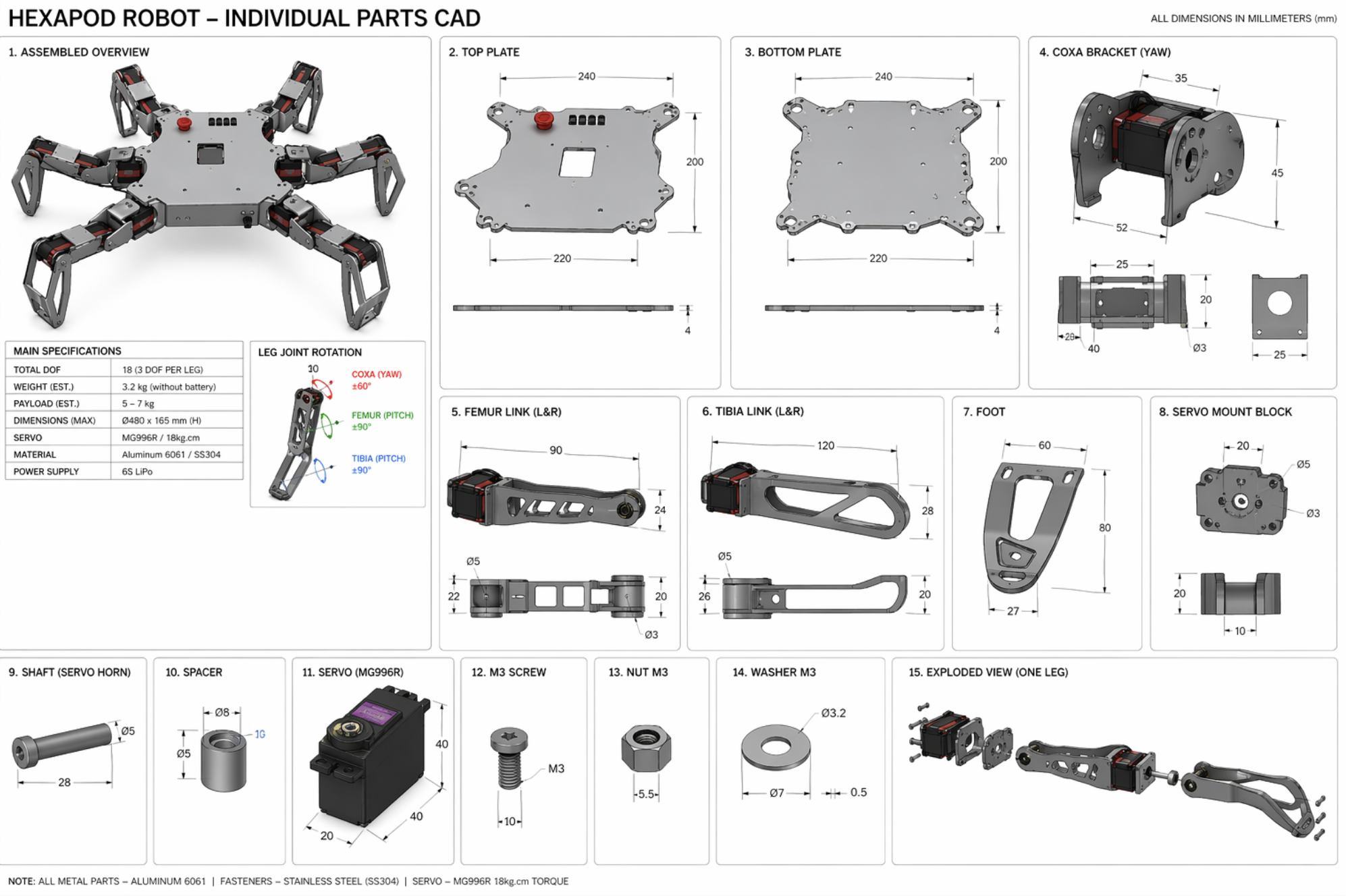
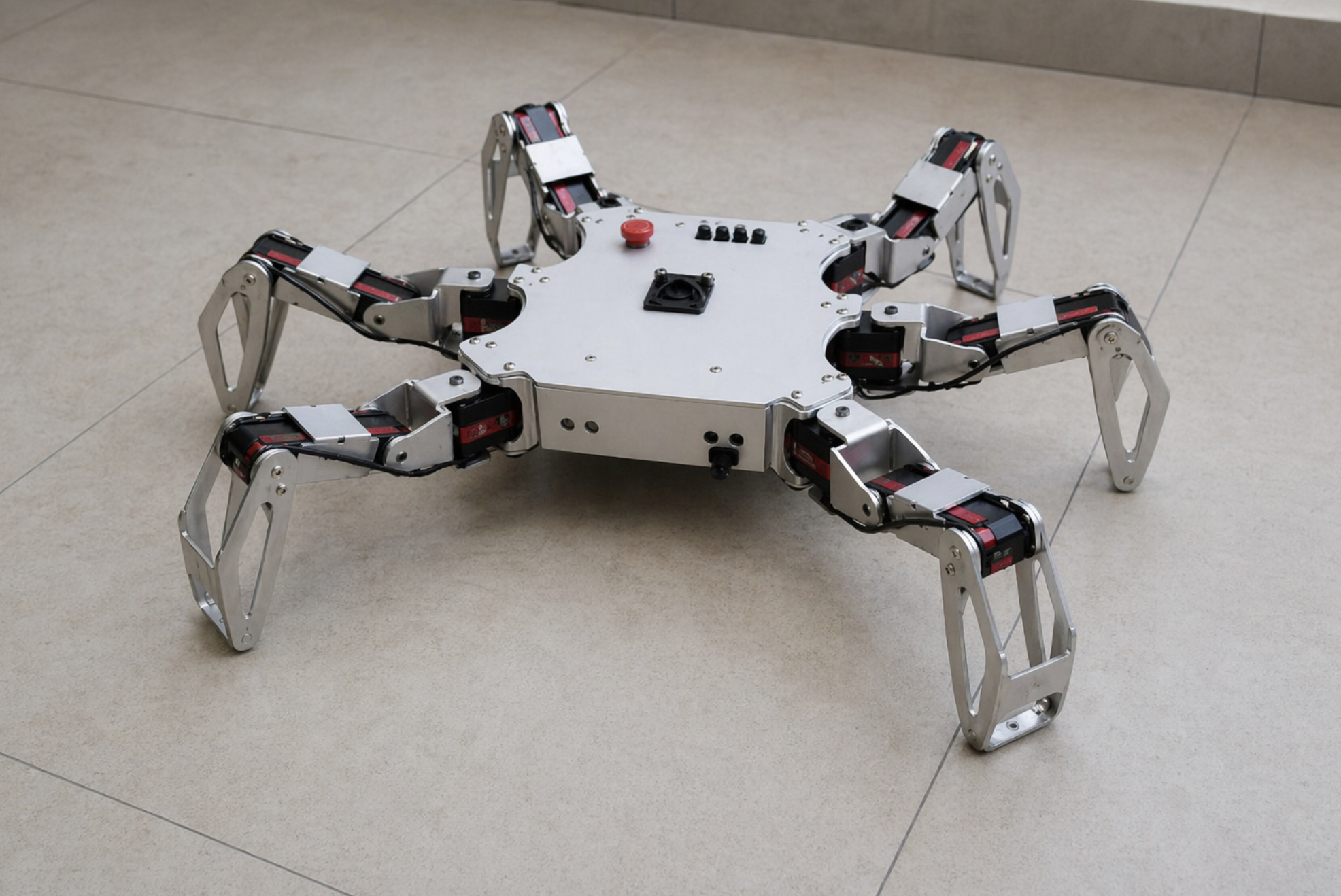
HexaPod
6-Legged Robot

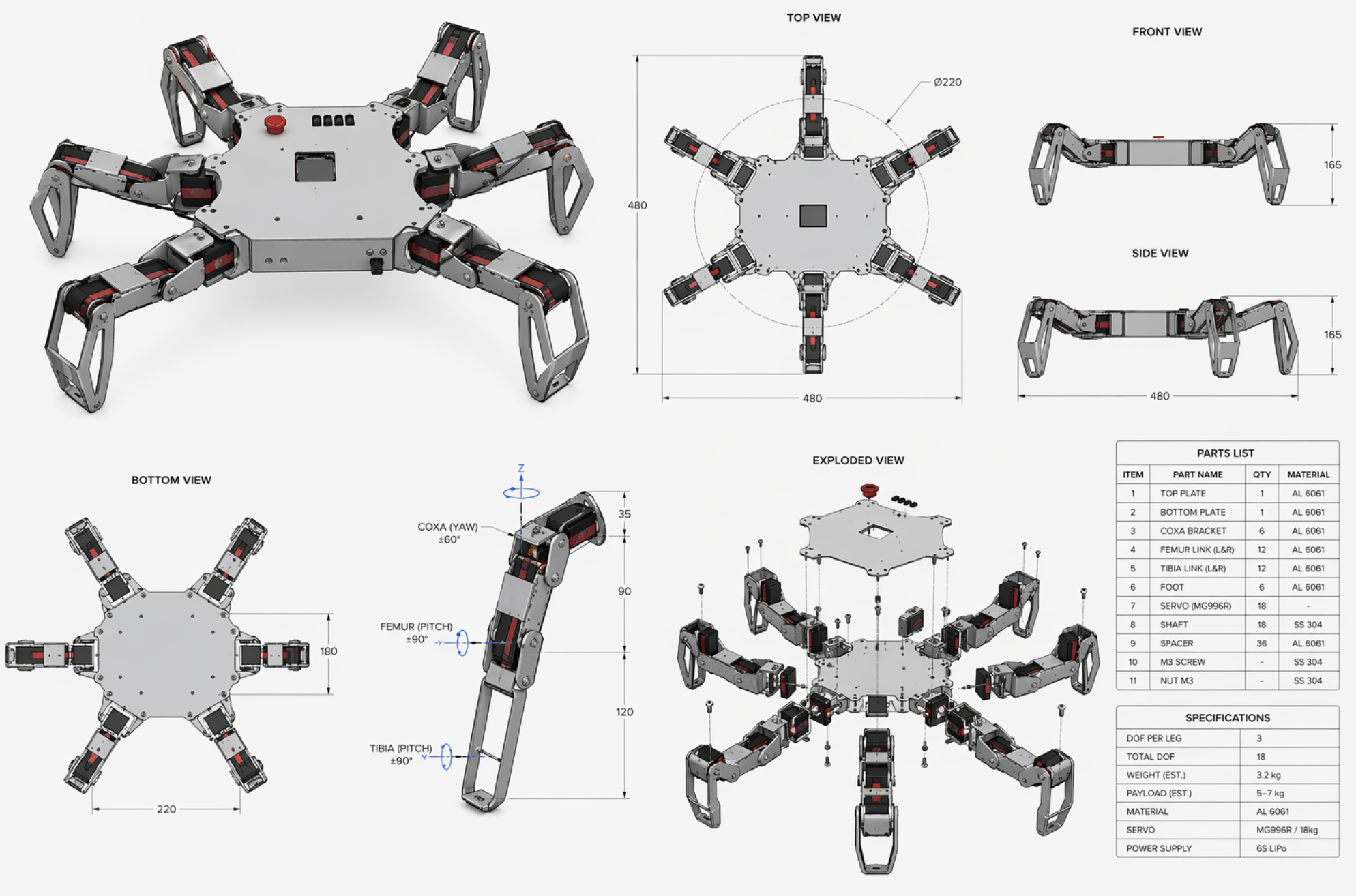
18 servos. 18 CNC-machined parts. One robot that seized mid-gait on its first test run — and 650 hours MTBF on the second version.

HexaPod · 6-DOF Walking Robot Exploded Top View · 18 Servo Axes BODY LEG ×1 COXA+FEMUR+TIBIA LEG ×2 LEG ×3 LEG ×4 LEG ×5 LEG ×6 CONTROL PCB · ESP32 SERVO PACK 20KG·CM × 18 TOLERANCE ±0.003" · CNC MACHINED TI6Al4V

The first version didn't work

The HexaPod seized mid-gait during its first real test run. Not a dramatic failure — it just stopped, mid-step, joints locked. Nobody in the room immediately understood what happened. I did, about ten minutes later, when I pulled up the assembly and started measuring.

Six tolerance stack-up issues. Components that passed individual inspection creating interference when assembled into a leg. A joint that was 0.008" off on its own became a binding point when multiplied across 3 joints per leg, 6 legs total. The robot didn't walk sideways. It stopped walking entirely.

What I actually changed

I audited every mating interface across all 18 machined components — starting from the hip joint outward and rebuilding the tolerance chain. Critical fits tightened to ±0.003". Three components got recut after direct conversations with the machinist about where the variation was actually coming from, not just where the drawing said it should be.

Then FEA and FMEA on all 24 structural components — not to find the highest stress point, but specifically to find failure modes that don't show up until hour 150 of operation. Found five. Fixed them before any physical work started on the second version.

I also wrote step-by-step work instructions for all 12 sub-assemblies. The whole reason the first version had stack-up problems is that assembly order wasn't controlled — different people assembling slightly differently, accumulating error in different directions. The documentation made it repeatable.

"The part I'm most proud of isn't the robot walking. It's that anyone could pick up the documentation and build it again — same result, every time." — Post-competition reflection

What I'd do differently

Run the tolerance analysis before ordering parts, not after the first build fails. That sounds obvious. It isn't when you're excited and the schedule is tight. The stack-up analysis cost me one build cycle — about three weeks. It would have cost nothing if I'd done it on paper first.

Lesson
Tolerance stack-up problems don't announce themselves. They show up as "it doesn't quite fit" or "the motion is slightly rough" — and if you don't recognize what you're looking at, you'll iterate forever without fixing the actual thing. The second build took one attempt because the first build told me what to actually measure.
Skills & Tools
RoboticsCNC FabricationFEAFMEAGD&TSolidWorks
hexapod-6-legged-robot
github.com/prabdeepg
What's inside
IK Solver Gait Controller Calculations BOM Tolerance Stack Issues Log Results
View on GitHub ↗
Results
Tolerance stack-up issues resolved6 → 0
Build iterations needed3 → 1
First-pass acceptance rate96%
Critical fit tolerance±0.003"
MTBF (first version)200 hrs
MTBF (after redesign)650 hrs
Positional accuracy±5mm / 500mm workspace
Repeatable build time4 hrs, zero fit issues
AwardNational #1 · $30K prize
03

Autonomous
Agriculture Mobile

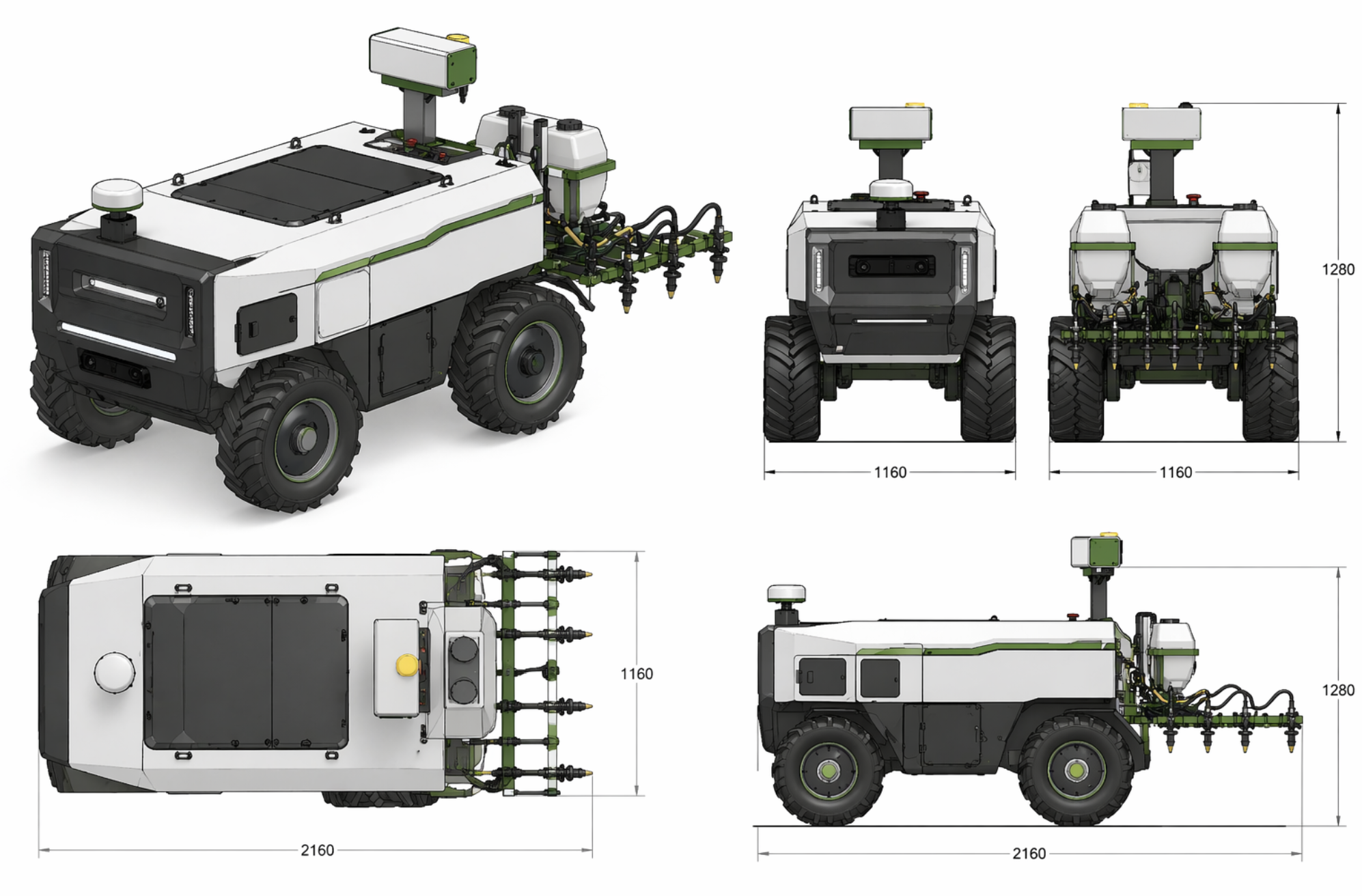
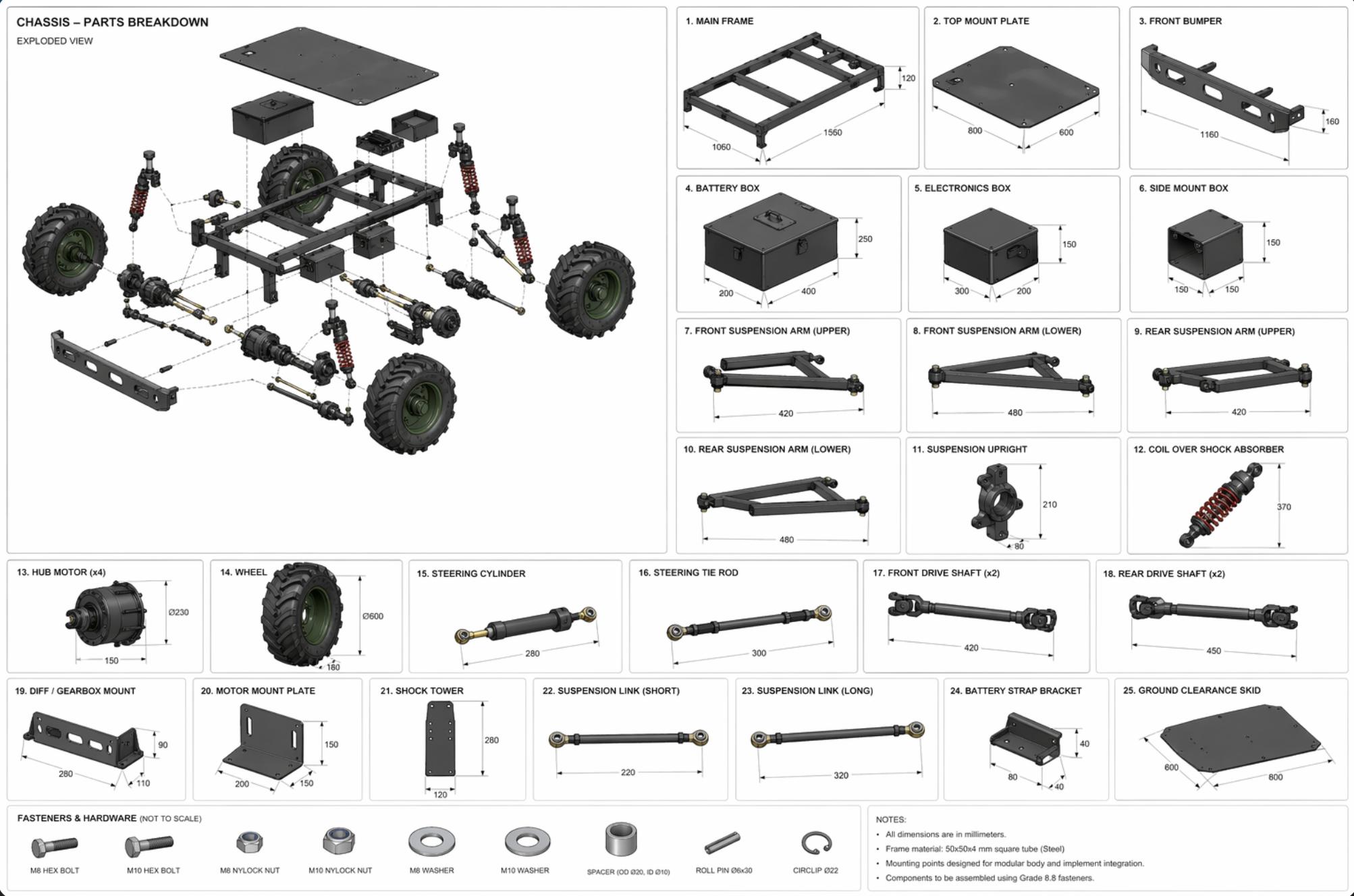
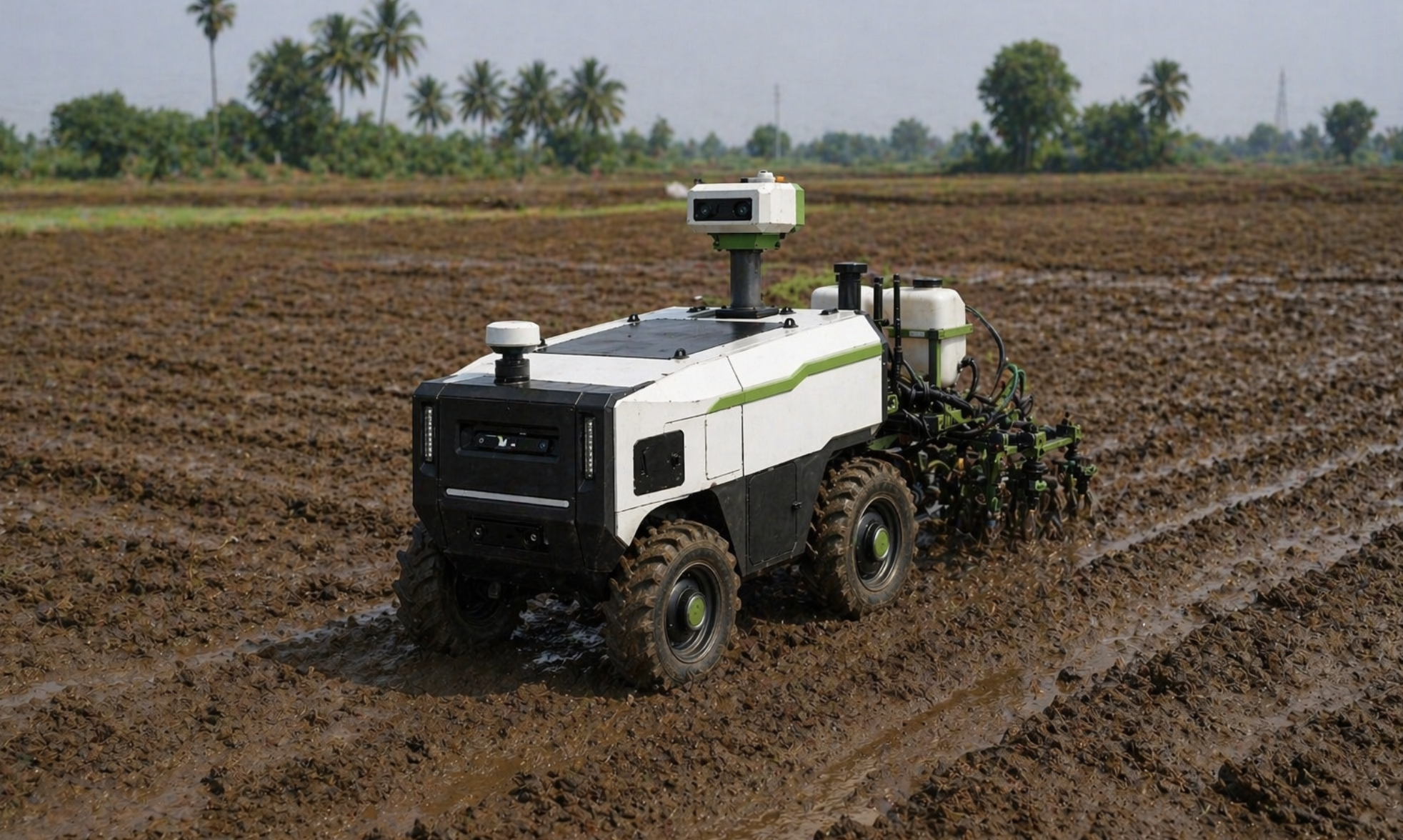
The first chassis design was buildable. Just not efficiently. 58% fewer weld joints, 35% better torsional rigidity, and 650+ hours of field operation later — here's what changed.

Agri Mobile · Autonomous Agriculture Vehicle Front 3/4 View · Chassis Breakdown ULTRASONIC SENSOR ARRAY × 7 CHASSIS 4340 STEEL FRAME WHEEL ASSY FL WHEEL ASSY FR WHEEL ASSY RL WHEEL ASSY RR SPRAY NOZZLE SYSTEM · 2M COVERAGE 58% FEWER WELD JOINTS · 35% TORSIONAL RIGIDITY GAIN · 650+ HRS FIELD OP

Built for dirt. Not a lab.

Most machines look clean at a demo. Real terrain, real vibration, and six weeks of actual field operation expose every shortcut you made during design. The target for this chassis was 650+ hours MTBF — not a spec handed to us, but a number we picked because anything less means the machine needs attention before a planting season is done.

The original design was too expensive to build

The first chassis had too many weld joints. Structurally fine. But expensive to fabricate — every joint is labor, fixturing time, and a potential failure point if the weld isn't perfect. I treated DFM as a hard constraint from the start of the redesign, not something to check at the end. Every geometry decision went through one question: can a real welder do this efficiently, and what's the cost if the joint has a small defect?

The result: 58% fewer weld joints. Fabrication time down 45%. $240 saved in labor on the first build alone. Material cost down 20% ($900 to $720) because removing joints meant removing material, not just reducing labor.

Stronger and lighter at the same time

Fewer joints doesn't automatically mean a better chassis — it means you need your geometry to work harder. I tested four structural configurations in FEA specifically targeting torsional stiffness before picking one. The final design improved rigidity by 35% while dropping total weight from 45 to 40 kg.

Then six weeks of field trials. Real terrain. Every anomaly tracked. Seven specific improvements came from field data, not from intuition. Field reliability went from 78% on the first version to 94% after those changes.

"A chassis isn't done when the FEA converges. It's done when the field data says it's done." — After six weeks of field trials
Lesson
DFM only works when it's built into the design process from the first sketch, not bolted on at review time. The weld joint reduction didn't happen because I was clever — it happened because I was asking fabrication questions while I was still drawing.
Skills & Tools
Chassis DesignDFMFEAField ValidationWelded Structures
autonomous-agriculture-mobile
github.com/prabdeepg
What's inside
Auger Controller EKF Navigation Calculations DFM Analysis BOM Issues Log Field Results
View on GitHub ↗
Results
Weld joint reduction−58%
Fabrication time−45%
Labor saved (first build)$240
Material cost reduction$900 → $720
Torsional rigidity improvement+35%
Weight reduction45 → 40 kg
Field reliability78% → 94%
MTBF achieved650+ hours
Field improvements (data-driven)7
02

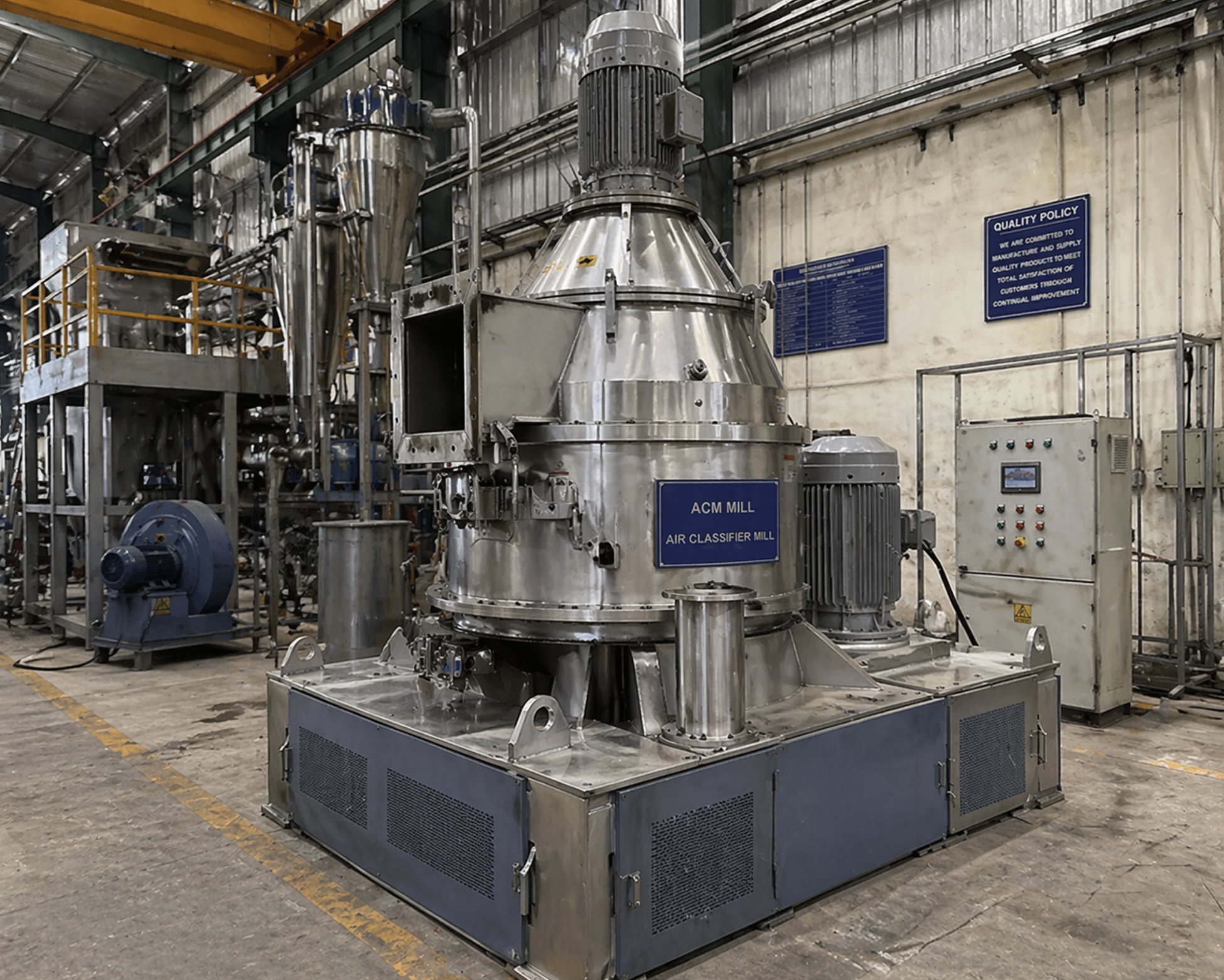
ACM Mill &
Conveyor Systems

15+ assemblies. 2,400 operating hours. Zero clogging failures. 40+ GD&T models that cut shop-floor questions by 85% — because a good drawing shouldn't need explaining.

ACM Mill · Grinding & Conveyor System Cross-Section View · Assembly Breakdown MILL HOUSING CAST IRON GRINDING ROTOR DRIVE MOTOR 15kW FEED HOPPER DISCHARGE CHUTE BEARING HOUSING CONVEYOR EXIT BELT 40+ GD&T ASSEMBLIES · 2,400 OPS HOURS · ZERO CLOGGING FAILURES
🔒 Photos cannot be shared due to NDA — ANG Enterprise

How an ACM Mill actually works

An ACM (Air Classifying Mill) is a high-speed impact grinding system. Material is fed into a rotor spinning at several thousand RPM — the impact shatters particles, and an internal air classifier simultaneously sorts them by size. Particles that haven't reached the target fineness get recirculated; those that pass the classifier exit as product. The result is precise, narrow particle-size distribution without overgrinding.

What makes them mechanically interesting is the tension between the rotor geometry, the classifier speed, and the airflow path. Change one, and the others need to compensate. The machine's performance is really the sum of a dozen interacting design decisions — none of which come with an obvious "correct" setting.

Reverse engineering from photographs and first principles

I didn't inherit documentation. I inherited a machine, some photographs, and the question: "can we make a better version?" I reverse engineered the complete assembly — working from operational photos and the known physics of impact grinding — to produce a full SolidWorks model of the existing design before touching a single modification.

That process taught me more about the machine than any manual would have. When you have to derive every dimension from a photo and verify it against the operating behavior, you understand the design choices at a different level. Why the classifier disk is that diameter. Why the rotor pins are spaced the way they are. Why the inlet geometry creates the airflow pattern it does.

From understanding to improvement

Once the baseline was documented, improvement became systematic. I redesigned the GD&T callout approach across 40+ CAD assemblies — not more callouts, just better ones. A machinist should be able to read a drawing and never need to pick up the phone. Shop-floor clarification requests dropped 85%. Rework from drawing ambiguity: down $12K.

For the mill assemblies specifically, redesign cycles dropped from 3 to 1 — the first version became the version that went to manufacturing. FEA on shaft assemblies caught 12 interference issues pre-build, preventing $8K in scrap. Root cause analysis on 24 assembly failures cut downtime from 48 to 17 hours. The ACM mill design developed here became a commercial product — ANG Enterprise now manufactures and sells it.

"I didn't have drawings to start with. I had photographs, physics, and the question: why does it work the way it does? The reverse engineering came first. The improvement came after." — ANG Enterprise, after completing the reverse-engineering model
Lesson
Reverse engineering a machine from operational evidence forces you to understand every design decision at a causal level — not just what it is, but why it has to be that way. That understanding is what separates a redesign that works from one that just looks different.
Skills & Tools
Industrial MachinerySolidWorksGD&TFEAProduction Engineering
acm-grinding-mill
github.com/prabdeepg
What's inside
Particle Predictor Rotor Stress Calc Tolerance Analyzer GD&T Docs Assembly Procedure BOM Issues Log
View on GitHub ↗
Results
ACM mill assemblies engineered15+
Redesign cycles3 → 1 (−67%)
Shop-floor clarifications−85%
Rework savings (GD&T)$12K
FEA interferences caught pre-build12
Scrap prevented by FEA$8K
Operating hours without clogging failures2,400
Scrap rate reduction8.5% → 2.1%
Total scrap savings$22K
Downtime reduction48 → 17 hrs (−65%)
04

EV Battery
Enclosure

A $500K prototype program. FEA under 3G crash loads. Less than 2mm deflection — confirmed before a single physical part was made. 95% design reuse into production.

EV Battery Enclosure · Structural Assembly Layer Exploded View · 3G Crash Validated BOTTOM TRAY A380 CAST ALUMINIUM COOLING PLATE MICROCHANNEL LIQUID COOL CELL ARRAY · 21700 FORMAT BATTERY MANAGEMENT SYSTEM CELL BALANCING + PROTECTION TOP COVER · IP67 ALUMINIUM EXTRUSION HV CONNECTOR $500K PROTOTYPE · 3G CRASH · <2mm DEFLECT · 95% DESIGN REUSE
🔒 Photos cannot be shared due to NDA — Ward Wizard Innovations

A $500K prototype. No margin for error.

Battery enclosures in electric vehicles aren't just structural components — they're safety-critical assemblies that contain high-voltage systems under crash loads, thermal stress, and vibration. At Ward Wizard Innovations, my job was to validate these designs before any physical prototype was built. That's a different pressure than designing for a lab test.

The validation approach

Using Abaqus FEA, I modeled the enclosure under 3G crash loads applied in multiple directions — not just the worst-case axis, but the realistic combination that a crash produces. The spec was under 2mm deflection under maximum load, with no failure at any mounting interface.

I also ran thermal analysis to confirm the enclosure stayed within its 15°C operational limit across the load cases. Both targets were confirmed in simulation before any physical work started — which is exactly the point. A simulation error costs hours. A hardware failure on a $500K prototype costs months.

From prototype to production

I supported three pilot builds (30 units total), identifying 16 issues during early assembly — before they became field problems. Rework costs on those builds: $28K down to $12.5K, a 55% reduction. The decisions made in prototype transferred well: 95% design reuse from prototype to production, one of the highest rates in the program.

14 ECOs implemented via ERP improved BOM accuracy from 87% to 92% and reduced procurement errors by 80%. That sounds like paperwork. It's not — a wrong BOM means the wrong parts get ordered, and wrong parts in an EV program means a two-week schedule hit at minimum.

"A simulation error costs you hours. A hardware error on a $500K prototype costs you months. Run the FEA seriously or don't run it." — Ward Wizard Innovations, pre-build validation phase
Lesson
95% design reuse doesn't happen by accident. It comes from making decisions in the prototype phase that anticipate production constraints — material availability, assembly sequence, tolerance callouts that a production line can actually hit. The prototype that looks like the production design is the one that transfers cleanly.
Skills & Tools
Electric VehiclesAbaqus FEAStructural AnalysisThermal AnalysisNPI
ev-battery-enclosure
github.com/prabdeepg
What's inside
FEA Post-Processor Thermal Model NPI Tracker Crash Analysis IP67 Sealing Calcs BOM DFMEA + DVP&R
View on GitHub ↗
Results
Deflection under 3G crash load<2mm ✓
Thermal limit maintainedwithin 15°C ✓
Prototype program value$500K
Pilot build units30 (3 builds)
Issues caught early16
Rework cost reduction$28K → $12.5K (−55%)
Assembly time improvement14 → 11.5 hrs (−18%)
Design reuse (prototype → production)95%
ECOs implemented14
BOM accuracy improvement87% → 92%

Each repo is a complete engineering package — not just code. Here's what you'll find across all four:

Python code — working solvers & controllers
Calculations — full hand-calc writeups
BOM — parts lists in MD + CSV
Issues & fixes — real problems, real solutions
Test results — target vs. achieved data
Docs — design theory, physics, assembly procedures
hexapod-6-legged-robot
IK solver, tripod gait controller, tolerance stack-up, stability analysis — full analytical approach to the National #1 robot.
Python Robotics GD&T 16 files
Open repo ↗
autonomous-agriculture-mobile
Auger controller, EKF navigation, seed drop timing calculator, DFM analysis — full autonomous seeding stack.
Python Robotics RTK-GPS 18 files
Open repo ↗
acm-grinding-mill
Particle size predictor, rotor stress calculator, tolerance analyzer, GD&T docs, full assembly procedure — the complete reverse-engineering package.
Python Manufacturing GD&T 17 files
Open repo ↗
ev-battery-enclosure
FEA post-processor, thermal model, NPI tracker with DFMEA & DVP&R, IP67 sealing calcs, crash analysis — full product development record.
Python EV Abaqus FEA 17 files
Open repo ↗
Visit github.com/prabdeepg ↗
Full Documentation

All 4 Projects in One PDF

Specs, calculations, BOMs, FEA results and issues logs — the complete engineering record for every project on this page.

View Projects Portfolio PDF
Project photo